Attention: Here be dragons
This is the latest
(unstable) version of this documentation, which may document features
not available in or compatible with released stable versions of Godot.
Checking the stable version of the documentation...
Локализация с использованием электронных таблиц
Электронные таблицы — один из самых распространённых форматов для локализации игр. В Godot электронные таблицы поддерживаются в формате CSV. В этом руководстве объясняется, как работать с CSV-ми.
Файлы CSV должны быть сохранены в кодировке UTF-8 без метки порядка байтов.
Предупреждение
По умолчанию Microsoft Excel всегда сохраняет CSV-файлы в кодировке ANSI, а не UTF-8. Встроенного способа сделать это нет, но есть обходные пути, описанные здесь:.
Вместо этого мы рекомендуем использовать LibreOffice или Google Таблицы.
Форматирование
Файлы CSV должны быть отформатированы следующим образом:
ключи |
<lang1> |
<lang2> |
<langN> |
|---|---|---|---|
KEY1 |
string |
string |
string |
KEY2 |
string |
string |
string |
KEYN |
string |
string |
string |
The "lang" tags must represent a language, which must be one of the valid
locales supported by the engine, or they must start with an underscore (_),
which means the related column is served as comment and won't be imported.
The KEY tags must be unique and represent a string universally. By convention, these are
usually in uppercase to differentiate them from other strings. These keys will be replaced at
runtime by the matching translated string. Note that the case is important:
KEY1 and Key1 will be different keys.
The top-left cell is ignored and can be left empty or having any content.
Here's an example:
ключи |
en |
es |
ja |
|---|---|---|---|
GREET |
Hello, friеnd! |
Hola, amigо! |
こんにちは (Привет) |
ASK |
Как ваши дела? |
Cómo está (Как дела)? |
元気ですか (Как поживаешь?) |
BYE |
Goodbye (Прощай) |
Adiós (Прощай) |
さようなら |
QUOTE (ЦИТАТА) |
"Hellо" said the man. |
"Hоla" dijo el hombre. |
「こんにちは」男は言いました ( |
Тот же пример показан ниже в виде простого текстового файла, разделённого запятыми, который должен быть результатом редактирования указанного выше в электронной таблице. При редактировании текстовой версии не забудьте заключить в двойные кавычки любое сообщение, содержащее запятые, разрывы строк или двойные кавычки, чтобы запятые не анализировались как разделители, разрывы строк не создавали новые записи, а двойные кавычки не анализировались как заключительные символы. Убедитесь, что в сообщении нет двойных кавычек, поставив перед ними другую двойную кавычку. Кроме того, вы можете выбрать другой разделитель, кроме запятой, в параметрах импорта.
keys,en,es,ja
GREET,"Hello, friend!","Hola, amigo!",こんにちは
ASK,How are you?,Cómo está?,元気ですか
BYE,Goodbye,Adiós,さようなら
QUOTE,"""Hello"" said the man.","""Hola"" dijo el hombre.",「こんにちは」男は言いました
Указание форм множественного числа
Начиная с Godot 4.6, вы можете указывать plural forms в CSV файлах.
This is done by adding a column named ?plural anywhere in the table
(except on the first column, which is reserved for translation keys).
By convention, it's recommended to place it on the second column.
Note that in the example below, the key column is the one that contains English
localization.
en,?plural,fr,ru,ja,zh
?pluralrule,,nplurals=2; plural=(n >= 2);,,
There is %d apple,There are %d apples,Il y a %d pomme,Есть %d яблоко,リンゴが%d個あります,那里有%d个苹果
,,Il y a %d pommes,Есть %d яблока,,
,,,Есть %d яблок,,
Примечание
Automatic Control translation is not supported when using plural forms. You must translate the string manually using tr_n().
Specifying translation contexts
Since Godot 4.6, it is possible to specify
translation contexts
in CSV files. This can be used to disambiguate identical source strings that
have different meanings. While this is generally not needed when using translation
keys LIKE_THIS, it's useful when using plain English text as translation keys.
This is done by adding a column named ?context column anywhere in the table
(except on the first column, which is reserved for translation keys).
By convention, it's recommended to place it on the second column, or after
?plural if it's also used. Note that in the example below, the key column
is the one that contains English localization.
en,?context,fr,ru,ja,zh
Letter,Alphabet,Lettre,Буква,字母,字母
Letter,Message,Courrier,Письмо,手紙,信件
Импортёр CSV
По умолчанию Godot обрабатывает файлы CSV как переводы. Он импортирует их и сгенерирует рядом с собой один или несколько сжатых файлов ресурсов перевода.
Импорт также добавит перевод в список переводов, загружаемых при запуске игры, указанный в project.godot (или в настройках проекта). Godot также позволяет загружать и удалять переводы во время выполнения.
Select the .csv file and access the Import dock to define import
options. You can toggle the compression of the imported translations, and
select the delimiter to use when parsing the CSV file.
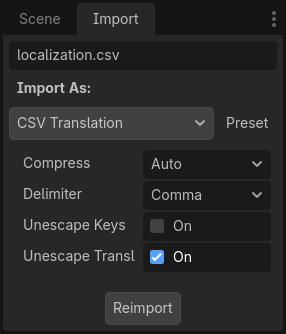
Be sure to click after any change to these options.
Loading the CSV file as a translation
Once a CSV file is imported, it is not automatically registered as a translation source for the project. Remember to follow the steps described in Настройка импортированного перевода so that the translation is actually used when running the project.